

- LTX Studio leads the pack for production-grade AI video — it's the only tool handling multi-scene projects with consistent characters, 4K output, and an open-source model you can run locally for free.
- Runway wins on speed for rapid prototyping, Sora on single-shot cinematic quality, and Google Veo/Flow on enterprise workspace integration — each fills a specific gap LTX Studio doesn't prioritize.
- For most teams, the practical stack is LTX Studio for video, Jasper or Copy.ai for copy, and Canva AI for static design — covering the full content workflow
Creating professional marketing content used to require a full production crew, expensive software, and weeks of iteration. Today, 87% of marketers report using AI tools to accelerate their workflows, yet most are still piecing together a fragmented stack of disconnected solutions.
The landscape has shifted dramatically. A year ago, AI video generation was experimental. Now it's production-ready. But with dozens of tools claiming to be “best-in-class,” choosing the right platform can be paralyzing.
This guide cuts through the noise. We've evaluated the top AI marketing tools across video production, copywriting, design, and automation. Whether you're a solo creator, in-house marketer, or running an agency, you'll find the tool (or combination) that matches your workflow and budget.
Quick Comparison Table
#1 LTX Studio — Best AI Video Production for Creatives & Studios
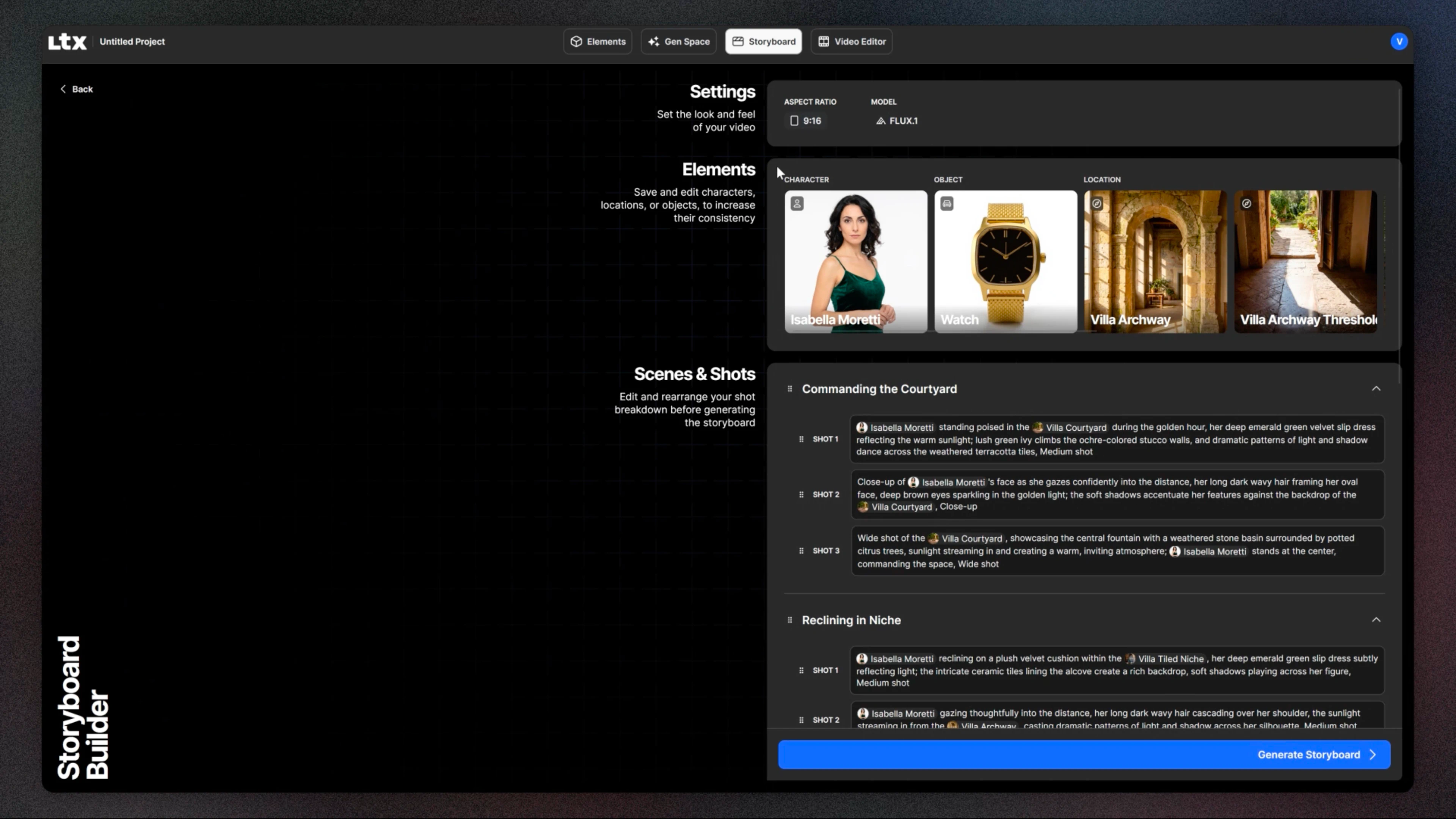
If you're serious about AI video production, LTX Studio is where most professionals are moving.
LTX Studio is a complete creative workspace built for multi-scene projects. Unlike single-shot tools, it lets you build entire videos—complete with consistent characters, motion control, and lip-sync across scenes. You can work from text prompts, images, or existing footage. Projects keeps your project organized as complexity grows.
Core capabilities:
- Text-to-video, image-to-video, audio-to-video in one interface
- Consistent character generation across multiple scenes (crucial for branded content)
- Motion control for precise camera movement and timing
- Lip-sync and face tracking for talking head videos and dialogue-heavy content
- Brand Kit integration to ensure on-brand colors, fonts, and styling
- Batch processing and upscaling to 4K at 50fps
- Collaboration features with shared workspaces (team workflows)
The main video model on LTX Studio is LTX-2.3, a 20.9B parameter model that delivers production-quality output at a fraction of the compute cost of competitors.
Pricing: LTX Studio offers a credit-based tiered pricing system with Free, Lite ($15/mo), Standard ($35/mo), and Pro ($100/mo) plans, plus a custom Enterprise plan that includes unlimited feature access, dedicated onboarding, SSO, GDPR/SOC 2 compliance, and volume pricing for organizations.
Best for: Agencies, Film & TV studios, in-house brand teams who need professional output and multi-scene complexity.
Learning curve: Moderate.
#2 Runway — Best for Rapid Video Prototyping
Runway was the pioneer that brought AI video to the mainstream. It's still excellent if speed and simplicity are your priorities.
Runway's strength is iteration velocity. You can generate a 4-second clip in under a minute, tweak the prompt, and have a new version in another 90 seconds. For agencies that need to explore multiple creative directions quickly, this matters.
Pricing: $12-55/month depending on monthly video generation quota.
Best for: Agencies exploring multiple creative directions. Small teams on tight deadlines. Anyone who values simplicity over production power.
Why LTX Studio ranks higher: Runway can't generate multi-scene content with consistent characters. It maxes out at 1080p. For production-grade work, LTX Studio is the more capable choice. For prototyping, Runway is still faster.
#3 Google Veo / Flow — Best for Google Workspace Integration
Google entered the AI video space with Veo and recently launched Flow (text-to-video). Both are powerful, particularly if your team already lives in Google Workspace.
If your workflow centers on Google Docs, Slides, and Drive, native integration with AI video generation is genuinely useful. You can generate clips without context-switching.
Positioning: Google positions Veo/Flow as the “Figma of filmmaking”—a collaborative workspace for video. The enterprise ambitions are clear.
Best for: Large organizations already using Google Workspace. Teams that need seamless collaboration between design, copywriting, and video production.
Limitations: Enterprise pricing (not published, but likely $5K+/year minimum). Not ideal for solo creators or small agencies.
#4 OpenAI Sora — Best for Cinematic Quality
OpenAI Sora produces some of the highest-fidelity video available today. If “visual quality” is your primary metric, Sora delivers.
The trade-off: it's slower. Generation times are longer, and the interface is more basic. You're paying for quality, not speed.
Pricing: $20/month (limited access, currently invite-only).
Best for: Premium content that will be viewed on large screens or heavily distributed. Film production companies. Anyone willing to wait longer for superior visuals.
Why it ranks below LTX: Sora can't handle multi-scene projects or character consistency. Single stunning shots, yes. Coherent multi-scene narratives, no.
#5 Copy.ai & Jasper — Best for Copywriting Complement
Video is visual, but it needs words. Copy.ai and Jasper excel at generating marketing copy: blog posts, email sequences, ad headlines, social captions.
These aren't video tools, but they're essential if you're building a complete content production workflow. Generate a video concept in LTX Studio, then use Jasper to write the accompanying blog post or email in seconds.
Pricing: $49-125/month.
Best for: Marketers and content teams who need copy at scale. Agencies managing dozens of clients. Solopreneurs who can't afford copywriters.
#6 Canva AI & Adobe Firefly — Best for Design Complement
For social graphics, thumbnails, and static design assets, Canva AI and Adobe Firefly are fast and accessible.
Canva's AI design assistant lets you generate social media templates with text-to-image. Adobe Firefly integrates with Photoshop and Premiere, useful if you're already in Adobe's ecosystem.
Pricing: Canva Pro is $13/month. Adobe Creative Cloud starts at $55/month.
Best for: Social media managers who need multiple design variations quickly. Anyone who isn't a professional designer but needs polished graphics.
How to Choose the Right AI Marketing Tool
Ask yourself these questions:
1. What am I creating?- Single promotional clips? Runway is fast.- Multi-scene branded videos? LTX Studio.- One-off cinematic shots? Sora.- Blog posts and copy? Jasper or Copy.ai.
2. What's my budget?- Tight: Use LTX Desktop (free) or Runway ($12/mo).- Moderate: LTX Studio Pricing Tiers ($99-299/mo) + Jasper ($49/mo) for copy.- Generous: Add Sora ($20/mo) and Adobe Firefly ($55/mo) for variety.
3. Do I need to collaborate?- Small team: Runway or LTX Studio (both have collaboration).- Enterprise: Google Veo/Flow.
4. How important is control and customization?- High: LTX Studio (open-source, fine-tuning, API).- Low: Canva or Copy.ai (simple, templated).
5. What's my timeline?- Urgent (next hour): Runway or Canva AI.- Flexible (next day): LTX Studio or Sora.
Final Verdict
The best AI marketing tool depends on your workflow, budget, and output quality requirements.
If you're choosing one tool: LTX Studio. It's the only all-in-one solution that handles video, character consistency, multi-scene projects, and 4K output. The free desktop version lets you test without financial commitment. If you need video production capability and budget is flexible, this is where professionals are converging.
If you need speed over everything else: Runway. It's not as powerful, but it's the fastest path from idea to rough cut.
If budget is the constraint: LTX Desktop (free) + Copy.ai (for copy) + Canva AI (for graphics). You'll have a functional content production stack for under $50/month.
If you're an enterprise team: Google Veo/Flow for workspace integration, or LTX Studio Cloud for production power.
The AI marketing tool landscape will keep evolving. New models will ship. Interfaces will improve. But the fundamentals remain: choose the tool that matches your output requirements, not the one with the flashiest marketing. Test with free or trial versions first. Build in time to master the interface before scaling production.
FAQ: Common Questions About AI Marketing Tools
Can AI generate videos from text?
Yes. LTX Studio, Runway, Sora, and Google Veo all support text-to-video. LTX Studio and Sora have the best quality.
Can I use AI videos commercially?
Yes, but check the terms. Most tools allow commercial use if you're on a paid plan. Verify the licensing before using AI content in client work or selling products.
What's the difference between text-to-video and image-to-video?
Text-to-video generates video from a written prompt alone. Image-to-video starts with an image and generates motion based on it. LTX Studio supports both. Image-to-video is often faster and more predictable.
Can AI tools generate consistent characters?
Only LTX Studio can reliably generate the same character across multiple scenes.


Maximize your creative potential with AI-powered tools
Maximize your creative potential with AI-powered tools





.png)


.png)



