

- The average creative team uses 10–15 tools to deliver a single project — and every tool switch creates friction, not efficiency.
- Tool fragmentation hurts in three ways: creative context gets lost across handoffs, coordination overhead compounds, and alignment gaps lead to expensive rework.
- By the time an idea moves from brainstorm to final edit, it's been reinterpreted so many times it barely resembles the original vision.
- Signs your stack is the problem: assets exported repeatedly, stakeholders reviewing static decks instead of live work, and time spent "translating" between tools.
- The fix isn't fewer specialized tools — it's fewer context switches, with exploration, storyboarding, and alignment happening in one connected workflow.
- Storyboards that once cost $1,000+ and took 3 days can now be created for $15–$125 in minutes — moving visualization upstream changes when alignment happens.
It's 3:47 PM on a Wednesday, and your creative director has been in eight different tools today.
Miro for the morning brainstorm. Figma to mock up concepts. Notion to document decisions. Google Slides to build the stakeholder deck. Slack to coordinate with the team. Frame.io to collect feedback. Back to Figma to make changes. Then Premiere to check the rough cut someone else is working on.
They haven't created anything yet today. They've just been managing the infrastructure of creation.
Welcome to the modern creative tech stack: more specialized than ever, more expensive than ever, and somehow, slower than ever.
The Promise vs. The Reality
The logic seemed sound: use the best tool for each job.
Miro for ideation. Boords for storyboarding. Google Slides for presentations. Frame.io for feedback. Premiere for editing. Each one best-in-class for its specific function.
The promise was efficiency through specialization. The reality? The average creative team now uses 10-15 different tools to get a single project from concept to delivery—and every one of those tools creates friction.
Here's what actually happens:
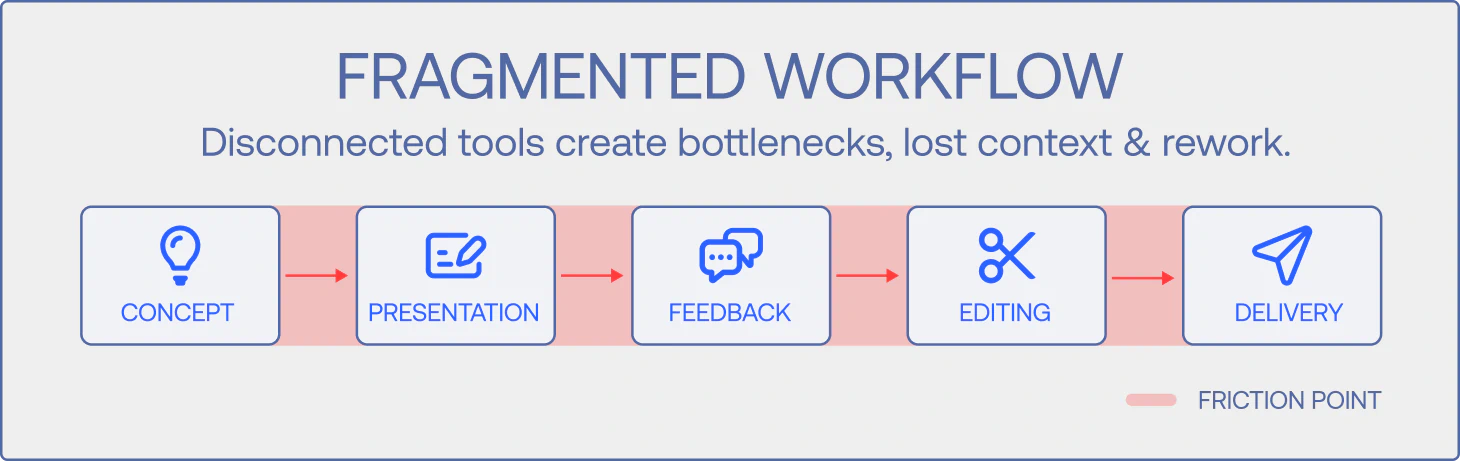
Brainstorming happens in one place. Storyboards get built in another. Presentations live somewhere else. Feedback is collected in yet another platform. Editing happens in a completely separate environment.
Every tool switch is a handoff. Every handoff is an opportunity for misalignment, lost context, and creative direction to slip through the cracks.
As teams have added more specialized tools, something counterintuitive has happened: coordination overhead has exploded. The time saved by using "the best tool" for each task gets consumed by the time spent switching between them, exporting files, managing permissions, and chasing updates across platforms.
More tools didn't make teams faster. It made workflows more fragmented.
The Three Hidden Costs of Tool Fragmentation
Tool sprawl doesn't just slow teams down. It actively undermines the work in three specific ways:
1. Context Loss Across Handoffs
The vision articulated in the brainstorm rarely survives intact to the final deliverable.
Here's how it typically degrades:
The creative team brainstorms in Miro. Big, bold ideas. They export key concepts and rebuild them in a Google Slides deck for stakeholders—simplifying to make it presentable. Stakeholders review the deck and give feedback based on their interpretation. The team takes that feedback back to Figma to create mockups—interpreting the feedback their own way. Then production begins, and the production team interprets the mockups their own way.
By the time the editor receives assets, they're working from their interpretation of someone else's interpretation of a simplified version of the original idea.
The concept starts bold. It gets sanitized in the presentation. It gets reinterpreted in production. And by the final edit, it barely resembles what the creative director had in mind.
This isn't malicious. It's structural. When creative work moves through disconnected tools, context doesn't transfer. The why behind decisions, the nuance of creative intent, the reasoning that led to specific choices—all of it lives in people's heads, not in the handoff.
2. Coordination Overhead That Compounds
Every tool in your stack requires someone to:
- Export and reformat files
- Manage access permissions
- Update version control across platforms
- Chase stakeholders who reviewed the wrong version
- Consolidate feedback that lives in five different places
- Reconcile conflicting edits made in parallel
This isn't creative work. It's logistics.
And when your team is already stretched thin trying to meet AI-era output demands, every hour spent on coordination is an hour not spent creating.
The average creative project goes through 5-7 rounds of revisions, with 60% of changes stemming from misaligned expectations. A significant portion of that misalignment comes from stakeholders reviewing different versions in different tools at different times—all technically working on "the same project."
3. Alignment Gaps That Create Expensive Rework
When creative teams are working in Figma version 4 but stakeholders are reviewing a Google Slides deck based on version 2, misalignment is inevitable.
When brand teams can't see work-in-progress because it lives in a tool they don't have access to, they can't give feedback until it's too late to be cheap.
When feedback is collected in Frame.io but the editor is working in Premiere without seamless integration, someone has to manually translate comments—and things get lost in translation.
Tool fragmentation doesn't just slow alignment. It prevents it from happening when it matters most: early, when creative direction is still flexible and changes are inexpensive.
How to Tell If Your Tool Stack Is the Problem
Not all tool stacks are created equal. Some genuinely enable better work. Others just create the illusion of efficiency while quietly draining resources.
Here's how to diagnose whether your stack is helping or hurting:
Question 1: How many times does a single asset get exported and re-imported? If you're constantly moving files between platforms, every transition is a potential point of failure. Each export-import cycle risks version confusion, file corruption, or simply using outdated assets.
Question 2: Can all stakeholders see work in progress, or only finished presentations? If brand leads, creative teams, and business stakeholders can't all view evolving work in the same place, alignment happens through presentations—which means it happens too late.
Question 3: Does updating one element require updating it in multiple places? If changing a project timeline in Asana doesn't automatically update the creative brief in Notion or the production schedule in Google Sheets, you're maintaining duplicate information that will inevitably drift out of sync.
Question 4: How much time goes to "translating" between tools? If someone on your team spends meaningful time reformatting feedback from Frame.io for the editor, or rebuilding Figma mockups in PowerPoint for stakeholders, or exporting Miro boards to share with people who don't have Miro access—that's pure waste.
Even one yes suggests your tool stack is creating more friction than value.
What's Actually Changing
Here's what teams scaling successfully have recognized: the problem isn't specialization itself. It's fragmentation.
The shift happening now is toward connected workflows where the core creative journey—exploration, storyboarding, iteration, stakeholder alignment—can happen without constant context switching and file handoffs.
This is what LTX was built for: consolidating the upstream creative workflow into a connected environment where teams can work visually from concept through pre-production. Instead of moving between separate tools for brainstorming, storyboarding, presenting, and collecting feedback, teams explore ideas, iterate on direction, and align stakeholders within the same workflow.
The impact isn't just organizational. It's economic. The average storyboard used to cost $1,000+ and take 3 days. With LTX, teams are creating storyboards with actualized visual references for $15-$125 in minutes. That's not just speed. That's a fundamental shift in when visualization happens and what it costs.
When visualization moves upstream—when teams can see motion and creative direction early—coordination overhead drops, context loss decreases, and alignment happens when changes are still cheap.
The Real Trade-Off
You can't eliminate all tools. Final editing still requires professional software. Complex motion graphics still need specialized tools. Sound design has specific requirements.
But you can eliminate the friction that comes from treating every phase of creative development as a separate stage requiring separate tools.
Creative teams don't need more tools. They need fewer context switches. When exploration, storyboarding, iteration, and alignment can happen in connected workflows, teams waste less time on logistics and more time producing.
Tool fragmentation isn't inevitable. It's a choice—often an unconscious one made over years of adding "the best tool" for each new need without considering the coordination cost.
The question isn't whether you should use specialized tools. The question is whether every tool in your stack is worth the handoff it creates.
{{blog-banner-static02}}


Maximize your creative potential with AI-powered tools
Maximize your creative potential with AI-powered tools





.png)

.png)



