
- Kling is a capable clip generator, but it lacks the production depth that serious video work requires — storyboarding, character consistency across scenes, and a full script-to-export workflow.
- The right alternative depends on your priorities: full production pipeline, fast iteration, cinematic quality, or budget — and each gap is filled by a different tool.
- For teams building multi-scene projects with consistent characters, one platform covers the entire workflow without context-switching between tools.
You're evaluating AI video tools, and Kling caught your eye. But before you commit, you should know what else is out there.
We've tested seven serious contenders that match or exceed what Kling offers. Some are faster. Some give you better control. Some cover the entire production workflow in one place. This guide cuts through the noise and shows you which tool fits your workflow, your budget, and your creative ambitions.
Quick Comparison
#1: LTX Studio — The Complete Production Workspace
If you're serious about AI video production, LTX Studio is where professionals are converging.
This isn't a clip generator. It's a complete production platform built for creators who need to take a project from script to finished video — in one place, without stitching together separate tools.
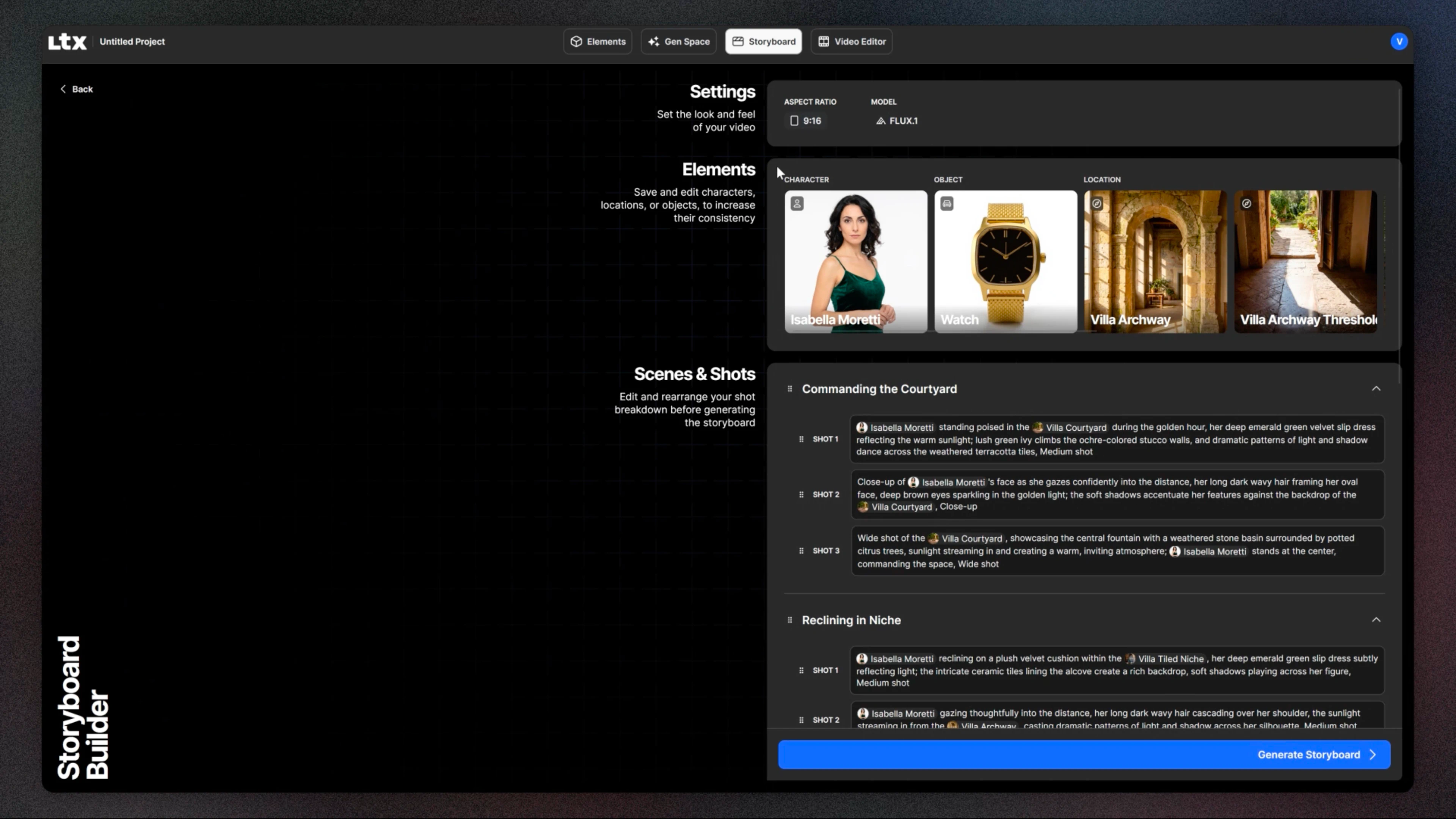
You get text-to-video, image-to-video, and audio-to-video all in one workspace. You can build multi-scene projects with consistent characters maintained across every shot. You can control exactly how things move with keyframe-level precision. You can storyboard visually before committing to generation.
What makes LTX Studio genuinely different is that it thinks in scenes and sequences, not isolated clips. Projects lets you organize shots, stack revisions, and see your full narrative come together.
AI Storyboards let you map the project visually before a single frame is generated. Persistent character profiles define appearance once and maintain it across every scene — solving the hardest consistency problem in AI video.
The Brand Kit keeps visual identity consistent across projects without manual tweaking. Collaboration features mean your team reviews, iterates, and approves inside the same workspace.
On the generation side, LTX Studio gives you access to multiple models — including LTX-2.3, Veo 3.1, Kling itself, and FLUX — all within the same interface. You're not locked into one model's strengths; you pick the right tool for each job without leaving the platform.
Pricing:
- Free: 800 one-time credits, LTX-2.3 model, personal use
- Lite: $15/month — recurring credits, personal use
- Standard: $35/month — commercial license, AI Storyboards, saved Elements, Veo 2 and Kling access
- Pro: $125/month — 110,000 credits, Veo 3.1 and Kling 3.0 Pro, 3 collaborators
- Enterprise: Custom — SSO, compliance (GDPR, SOC 2, ISO), unlimited collaborators, dedicated support
Best for: Agencies, film & TV media networks, brand studios, and content teams who need narrative control, character consistency, and a complete production workflow — not just individual clips.
Pros:
- Only platform covering script, storyboard, generation, editing, and export in one place
- Character consistency across scenes — genuinely solved, not approximated
- Multi-model access (LTX-2.3, Veo, Kling, FLUX) without context-switching
- Enterprise-ready with compliance coverage for teams that need it
#2: Runway — Speed Meets Polish
Runway is the reason Kling exists. It arrived first and refined the experience so well that everyone else is still catching up.
You open Runway, describe your video, and hit generate. The interface is intuitive. The queue moves fast. Within minutes, you have a clip. If you don't like it, you iterate. Runway's speed lets you experiment without penalty.
Runway leads on UX. The controls feel natural. The onboarding is gentle. It's the tool that makes video generation feel less like science and more like creation — a real advantage if your team isn't AI-video native or if you need to move quickly.
Where Runway shows its limits is depth. Multi-scene projects require workarounds. Character consistency across clips demands manual alignment. Fine motion control exists but isn't the primary strength. If you're building a narrative with recurring characters or you need a full production pipeline, you'll feel the ceiling.
Price: Free tier (limited). Paid tiers from $12 to $76/month.
Best for: Teams prioritizing fast iteration, exploratory projects, and UX polish over production depth.
#3: Google Veo — Enterprise Muscle
Google released Veo with a clear target: high-end production work where quality is non-negotiable.
Veo outputs visibly sharper, more detailed video. Camera control is sophisticated. Frame consistency is a step above most competitors. For enterprise budgets and broadcast-quality requirements, it delivers.
The catch: availability is limited. Pricing is custom — you negotiate with a sales team. It's built for studios and agencies, not solo creators or small teams.
Price: Custom enterprise pricing.
Best for: High-end production studios, enterprise teams, broadcast-quality requirements.
#4: OpenAI Sora — Cinematic Photorealism
Sora is the bell-ringer. The videos look like they were shot with a real camera. The detail is striking.
But access is tightly controlled. You're on a waitlist. For most people, Sora remains a tool you read about rather than one you actually use in production. And even with access, it's a clip generator — there's no storyboarding, no character consistency across scenes, no production pipeline.
Price: Waitlist (limited rollout).
Best for: Creators with approved access and a quality-first mindset for single hero shots.
#5: Synthesia — Avatar Videos Made Simple
Synthesia solves a specific problem: talking-head videos with consistent presenters. You provide a script, it generates an avatar delivering it with accurate lip-sync. Purpose-built for corporate training and explainer content.
If your workflow doesn't involve presenters, Synthesia doesn't add much value. It's a specialist tool that's excellent at its job.
Price: $25 to $100/month.
Best for: Corporate training, explainer videos, presenter-focused content.
#6: Pika — Accessible and Friendly
Pika targets the casual creator. Approachable, affordable, low barrier to entry. If you're exploring AI video without a production budget, it's a legitimate starting point.
Where it falls short: consistency, motion control, and batch operations feel secondary to simplicity. You're trading power for access.
Price: Free tier available. Paid plans from $10/month.
Best for: Hobbyists, small creators, budget-conscious experimenters.
#7: Haiper — Emerging Style Control
Haiper is newer but worth watching. Its focus is style consistency and creative control over motion and composition. The model is improving fast. Not yet at the maturity of Runway or the depth of LTX Studio, but a credible option for style-driven creators.
Price: Free tier. Premium from $5/month.
Best for: Style-driven creators, early adopters.
How to Choose
What's your production scope?
If you're generating one-off clips for social, Runway's speed and UX win. If you're building multi-scene projects with recurring characters — branded content, narrative video, campaign series — LTX Studio's storyboarding and production pipeline justify the learning curve.
How important is character consistency?
Building a narrative with the same character across scenes? LTX Studio and Google Veo 2 are the serious options. Runway and Pika require manual alignment.
What's your budget and workflow preference?
LTX Studio's free tier gives you access to the platform to explore before committing. Pika and Haiper are cheapest for casual use. Veo 2 and Sora are premium but justify it through output quality for those who can access them.
The Bottom Line
Kling is a capable tool. But if you're making more than casual videos, you should test at least two or three alternatives before committing.
Start with LTX Studio's free tier and run a test project. You'll quickly understand whether the storyboarding, character consistency, and production depth justify the learning curve. If they do, you've found your platform. If you prefer something faster and lighter, Runway stays your answer.
The right choice depends on your workflow, not on which tool is most hyped. Test, measure, commit.
Frequently Asked Questions
Is Kling better than these tools?
Kling is competitive on speed and output quality, and it's actually available as a model option within LTX Studio. As a standalone tool it's solid, but it lacks the production workflow, storyboarding, and character consistency that LTX Studio provides.
Which tool is best for consistent character animation?
LTX Studio leads for production workflows — character profiles are defined once and maintained across every scene. Google Veo and Sora deliver superior photorealism but with access constraints.
Can I use these tools for commercial projects?
Yes, but read the terms for each platform. Most platforms allow commercial use on paid tiers.


Maximize your creative potential with AI-powered tools
Maximize your creative potential with AI-powered tools






.jpeg)

.png)



